

M2 Register for a Secure and Easy Account Creation
Table of Contents
Registration Requirements

Prepare Your Registration Information
M2 allows new members to create an account using a username, password, and an optional Referral Code when provided by an agent or existing member. Users can verify their account through either Mobile OTP or Email OTP before completing registration.
Supported Registration Devices
Registration is available through modern browsers on Android phones, iPhones, tablets, Windows PCs, and macOS devices without requiring complicated installation.
M2 Register Steps
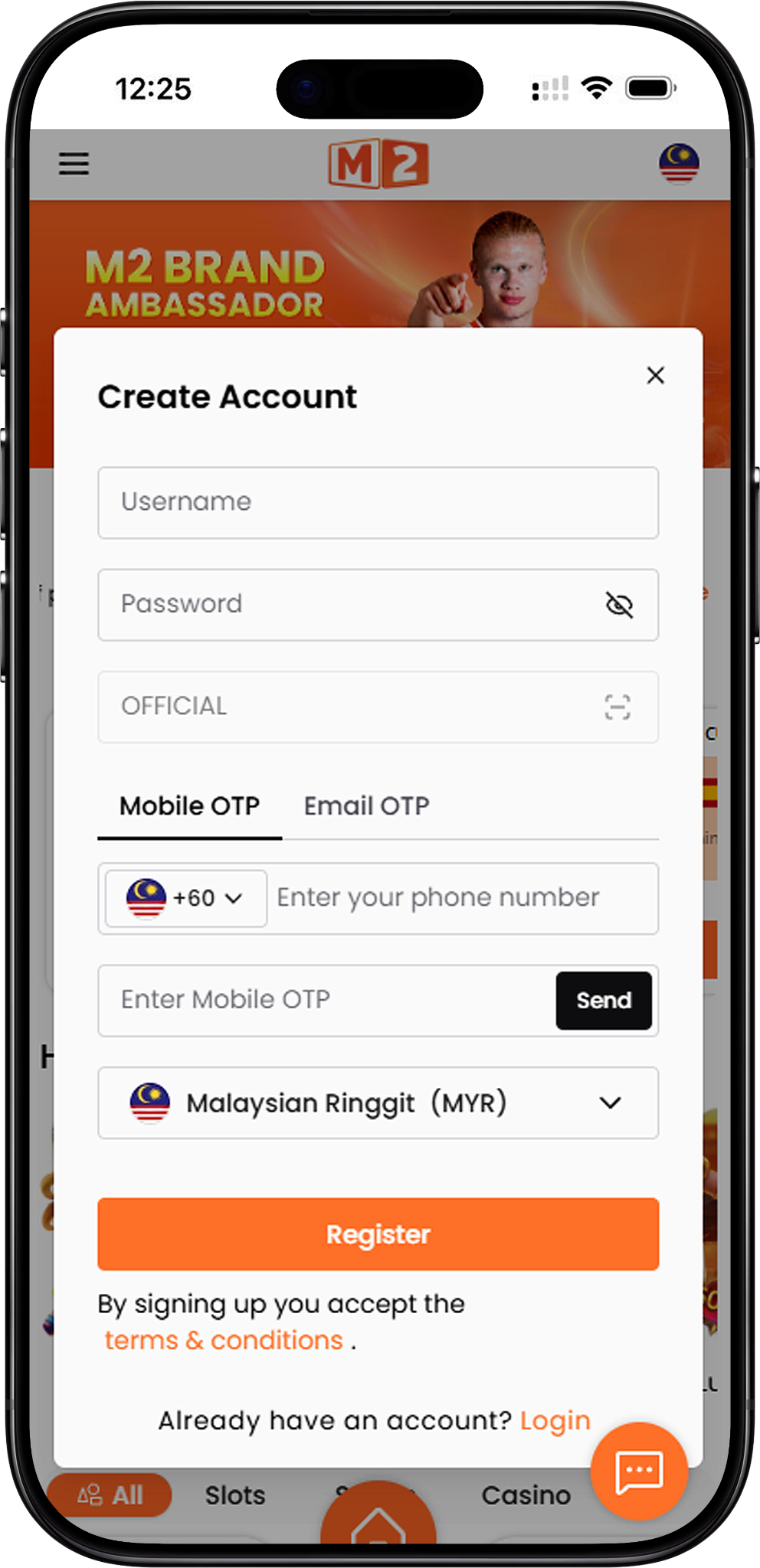
Step 1 – Open the Registration Page
Visit Register (/en/register – Internal Link) to access the official registration form. You may also start from Home (/en – Internal Link). The official website can also be accessed through m2mys.com.
Step 2 – Complete Your Account Details
Enter a unique username, create a secure password, and add a Referral Code if one has been provided. The information should be reviewed carefully before moving to verification.
Step 3 – Choose Your Verification Method
Select either Mobile OTP or Email OTP. Enter your mobile number or email address, request the verification code, and input the OTP to continue the registration process.
Step 4 – Select Your Currency
Choose Malaysian Ringgit (MYR) as your preferred account currency before submitting your registration details.
Step 5 – Complete Registration
Review all information and click Register to finish account creation. After successful registration, continue to Login (/en/login – Internal Link) to access your member account.
Mobile OTP and Email OTP Verification
Mobile OTP Registration
Members who prefer phone verification can enter a valid mobile number, receive a one-time password, and complete verification securely before account activation.
Email OTP Registration
Members who prefer email verification can provide a valid email address, request an Email OTP, and verify ownership before completing registration.
Referral Code and QR Code Registration
Using a Referral Code
A Referral Code may be supplied by an authorised referrer or agent. Entering the code during registration helps connect the new account to the correct referral network where applicable.
Register with a QR Code
Members who receive a registration QR Code can scan it to access the correct registration page and automatically include the associated referral information when available.
Registration Tips for New Members
Create Strong Login Credentials
Use a password with a combination of uppercase letters, lowercase letters, numbers, and symbols. Avoid sharing your password with anyone to help protect your account.
Verify Before Submitting
Double-check your username, referral information, verification code, and selected currency before clicking Register to minimise registration errors. Explore Download (/en/download – Internal Link), Games (/en/games – Internal Link), Deposit (/en/deposit – Internal Link), and About Us (/en/about-us – Internal Link) after registration for additional guidance.
Frequently Asked Questions
Is a Referral Code required?
A Referral Code may be optional unless specified by the registration invitation or promotional campaign.
Can I register using my phone?
Yes. Mobile browsers on Android and iPhone devices fully support the registration process.
Which verification method can I choose?
Members can choose either Mobile OTP or Email OTP based on their preferred verification method.
Where can I learn more about platform policies?
Visit Terms and Conditions (/en/terms-and-conditions – Internal Link) and About Us (/en/about-us – Internal Link) for additional platform information before registering.