

M2 Deposit with Secure and Convenient Payment Methods
Table of Contents
M2 Deposit Methods
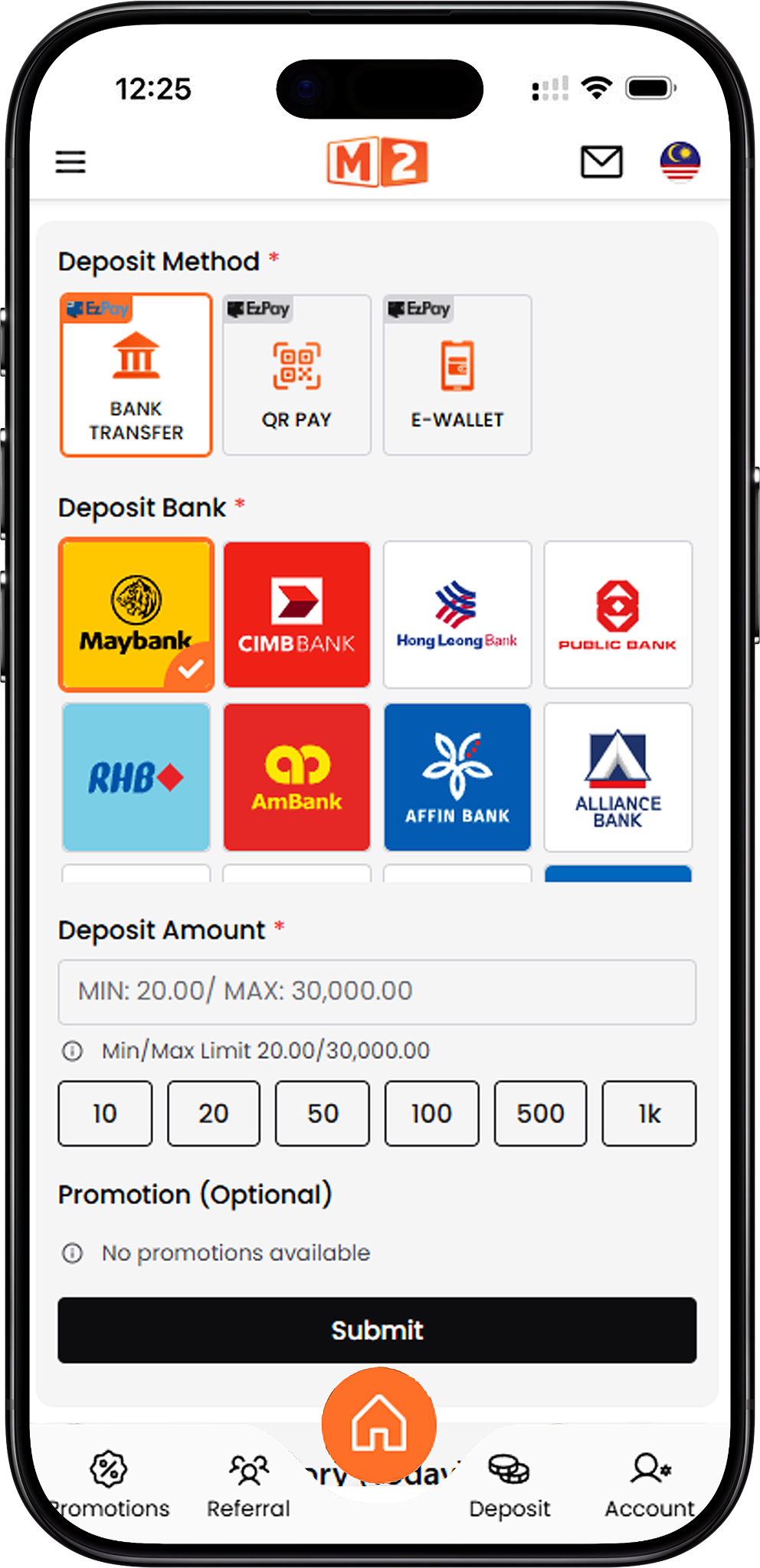
Multiple Ways to Fund Your Account
M2 provides several deposit methods, allowing members to fund their accounts through Bank Transfer, QR Pay, or E-Wallet. Members can choose the option that best matches their preferred payment method before submitting a deposit request.
Secure Funding Experience
Deposits are completed through the member account using supported payment channels. Members can begin from Login (/en/login – Internal Link) or return to Home (/en – Internal Link). The official platform is available at m2mys.com.
Supported Deposit Options
Bank Transfer
Members can choose Bank Transfer and select from supported financial institutions including Maybank, CIMB Bank, Hong Leong Bank, Public Bank, RHB Bank, AmBank, Affin Bank, Alliance Bank, UOB, OCBC Bank, Bank Islam, Bank Rakyat, Bank Muamalat, Kuwait Finance House, Standard Chartered, M2E, PB Enterprise, BSN, HSBC, Bank of China, and Agro Bank where available.
QR Pay
QR Pay provides a convenient deposit method by allowing members to complete payments through supported QR payment services using compatible banking or payment applications.
E-Wallet
Supported E-Wallet services may include Touch ’n Go eWallet, ShopeePay, Boost, GrabPay, and MCash, depending on account availability and supported payment channels.
M2 Deposit Steps
Step 1 – Open the Deposit Page
Sign in to your member account and select Deposit (/en/deposit – Internal Link) from the Wallet or Funds menu.
Step 2 – Select a Deposit Method
Choose Bank Transfer, QR Pay, or E-Wallet. If Bank Transfer or E-Wallet is selected, choose the preferred supported bank or wallet provider before continuing.
Step 3 – Enter the Deposit Amount
Input the preferred deposit amount within the displayed minimum and maximum limits. Members may also choose one of the preset amount buttons when available.
Step 4 – Review Optional Promotions
If a deposit promotion is available, review the promotion details before submitting the request. Members may continue without selecting a promotion when preferred.
Step 5 – Submit the Deposit Request
Confirm the selected payment method, deposit amount, and provider before clicking Submit. Deposit history can be viewed after the request has been processed.
Deposit Limits and Processing
Deposit Amount Guidelines
Minimum and maximum deposit limits are displayed automatically according to the selected payment method. Members should review the displayed limits before submitting each transaction.
View Deposit History
Completed and pending transactions can be reviewed in the Deposit History section for easier tracking of account funding activity. Members may also continue to Withdrawal (/en/withdrawal – Internal Link), Games (/en/games – Internal Link), Promotions (/en/promotions – Internal Link), and Rebate (/en/rebate – Internal Link) after funding their account.
Frequently Asked Questions
Which deposit methods are available?
Members can choose Bank Transfer, QR Pay, or E-Wallet depending on available payment channels.
Are multiple banks supported?
Yes. The platform supports various Malaysian banking institutions together with selected digital payment providers where available.
Can I review my deposit history?
Yes. Deposit History displays previous deposit requests together with transaction details and processing status.
Where can I find more platform information?
Additional information is available through About Us (/en/about-us – Internal Link) and Terms and Conditions (/en/terms-and-conditions – Internal Link). New members can complete Register (/en/register – Internal Link) before making their first deposit.