

Create account

Click Join Now. Fill in your login info





Dear M2 Members, Thank you for continuously choosing and supporting M2. Your trust motivates us to keep improving and delivering a better entertainment experience for all users. At M2, we are dedicated to maintaining a stable, secure, and transparent platform where every member can enjoy smooth and fair gameplay with confidence. Our team continuously upgrades system performance, security measures, and service quality to provide a more enjoyable environment for everyone. To ensure fairness across the platform, we kindly remind all members to follow the platform regulations and participate responsibly. Any form of irregular activity, misuse of promotions, unfair gameplay, multiple account abuse, or activities that disrupt platform fairness are strictly prohibited. Members who participate fairly and comply with platform guidelines will continue to enjoy long-term benefits, exclusive activities, and quality services provided by M2. In cases where unusual or suspicious activities are detected, the platform reserves the right to conduct reviews and take necessary actions according to platform policies. M2 remains committed to building a trusted and professional entertainment platform for all users. We appreciate your understanding, cooperation, and continued support. Wishing you a smooth experience and enjoyable moments with M2. - M2 Official Team











































Welcome to M2 - Trusted Online Casino
Click Join Now. Fill in your login info

Make your first deposit using cash or an e-wallet

Start winning while playing on your favourite games

Don't forget to claim your bonuses
All-New M2 App
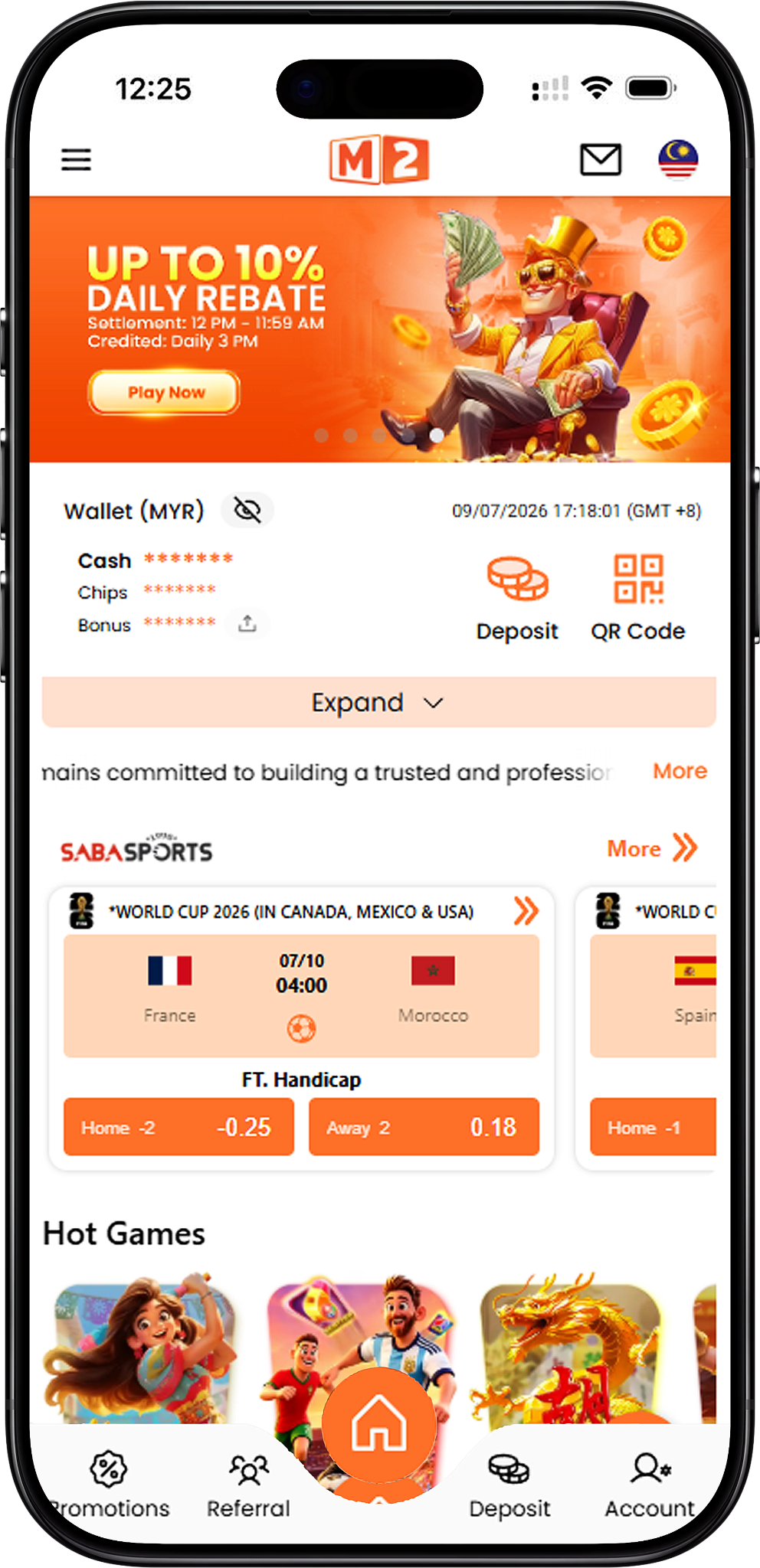
M2 provides a browser-based entertainment experience designed for Malaysian players. Members can access supported games directly through compatible web browsers on Android, iPhone, Windows, and macOS devices without requiring a traditional application installation. Those who wish to create a browser shortcut can visit Download (/en/download – Internal Link) for detailed setup instructions. Visit the official platform at m2mys.com.
M2 offers a wide variety of entertainment categories including Games (/en/games – Internal Link), Slots (/en/games/slots – Internal Link), Sports (/en/games/sports – Internal Link), and Casino (/en/games/casino – Internal Link). Members can explore recognised providers through a single account with a simple browser experience.
Members can create an account through Register (/en/register – Internal Link), securely access their profile through Login (/en/login – Internal Link), and manage transactions using Deposit (/en/deposit – Internal Link) and Withdrawal (/en/withdrawal – Internal Link).
M2 supports quick browser access across multiple devices, allowing members to continue their entertainment experience at home or on the go with a consistent interface and responsive navigation.
Members can enjoy recognised entertainment providers across Slots, Sports, and Casino categories, giving access to a diverse selection of games within one platform.
M2 is available in English, Bahasa Malaysia, and Mandarin, helping members navigate the platform, manage their accounts, and communicate with customer support more comfortably.
M2 is designed for Malaysian players by supporting English, Bahasa Malaysia, and Mandarin. Browser-based technology helps members enjoy entertainment without depending on application stores while remaining compatible with a wide range of devices.
Whether using Android smartphones, iPhones, Windows PCs, or macOS computers, members can access the platform through supported browsers. Optional browser shortcuts are available for quicker access without requiring large downloads through Download (/en/download – Internal Link).
M2 promotes responsible entertainment while providing account management tools, secure login features, and identity verification where required. Members can review About Us (/en/about-us – Internal Link) and Terms and Conditions (/en/terms-and-conditions – Internal Link) for additional platform information.
Members can explore a broad collection of entertainment from recognised providers across Slots (/en/games/slots – Internal Link), Sports (/en/games/sports – Internal Link), and Casino (/en/games/casino – Internal Link), all accessible through a single member account.
M2 supports convenient account funding and withdrawals through local banking channels, QR payment options, and selected e-wallet services. Members can learn more by visiting Deposit (/en/deposit – Internal Link) and Withdrawal (/en/withdrawal – Internal Link).
From registration and secure account access to entertainment and customer support, M2 is designed to provide a straightforward user experience for members using supported desktop and mobile devices.
Members can conveniently use supported Malaysian banking channels, QR payment services, and selected e-wallet providers to manage account funding and withdrawals securely. Learn more through Deposit (/en/deposit – Internal Link) and Withdrawal (/en/withdrawal – Internal Link).
M2 brings together recognised providers across Slots (/en/games/slots – Internal Link), Sports (/en/games/sports – Internal Link), and Casino (/en/games/casino – Internal Link), offering members a wide variety of entertainment experiences through a single browser-based platform.
Members can access the platform directly from compatible Android, iPhone, Windows, and macOS browsers without installing large applications. Optional browser shortcuts are available through Download (/en/download – Internal Link).
M2 supports secure account registration, login, deposits, withdrawals, and account management to provide a smoother experience for eligible members throughout their platform journey.
Customer support is available to assist with account enquiries, technical guidance, payment questions, and general platform navigation. Members can also review About Us (/en/about-us – Internal Link) for additional platform information.
Players interested in expanding their network can explore the Agent (/en/agent – Internal Link) programme to learn more about referral opportunities and available shareholder information.
Whether using a smartphone, tablet, laptop, or desktop computer, members can continue enjoying the same platform experience with responsive browser compatibility across supported operating systems.
M2 allows members to enjoy entertainment directly through compatible browsers without depending on traditional app installations. Members who prefer quicker access can create a browser shortcut by following the Download Guide (/en/download – Internal Link).
Members can choose from supported local bank transfers, QR payment solutions, and selected e-wallet services for convenient deposits and withdrawals. Visit Deposit (/en/deposit – Internal Link) and Withdrawal (/en/withdrawal – Internal Link) for additional information.
The platform combines Slots (/en/games/slots – Internal Link), Sports (/en/games/sports – Internal Link), and Casino (/en/games/casino – Internal Link), allowing members to enjoy different entertainment styles through a single account.
Android phones, iPhones, Windows PCs, and macOS devices are supported, allowing members to continue using the platform seamlessly across multiple devices.
M2 collaborates with recognised providers to deliver a diverse collection of slot games, sports entertainment, and live casino experiences suitable for different player preferences.
Members can easily create an account, sign in securely, manage transactions, and access entertainment through Register (/en/register – Internal Link) and Login (/en/login – Internal Link).
M2 encourages responsible entertainment by providing secure account management, verification features where applicable, and clear platform policies available through Terms and Conditions (/en/terms-and-conditions – Internal Link).
English, Bahasa Malaysia, and Mandarin language options help members navigate the platform, understand available services, and communicate more comfortably with customer support.
M2 offers hundreds of slot titles from providers including Lucky365, Microslot, Monkey King, PT Slot, JILI, PP Slot, Fachai, JDB, AskMeSlot, and YGR. Members can discover classic themes, jackpot features, adventure games, and modern video slots across multiple providers.
Members can enjoy sportsbook entertainment through Gogoli Track, MarbleX, Maxbet, RCB988, SV388, and SBO. Supported sports providers offer a variety of sporting events and entertainment experiences throughout the year.
M2 provides live casino entertainment from recognised providers including AE Sexy, Hotroad, Evolution, Playtech, and BIG GAMING. Members can enjoy live dealer experiences across multiple table game categories.
M2 is designed for Malaysian players with multilingual support, browser-based accessibility, local payment methods, and recognised entertainment providers, creating a convenient experience across supported devices.
Registration, account management, deposits, withdrawals, promotions, and entertainment categories are available through one integrated member platform, reducing the need to switch between different services.
Members can access the platform through supported browsers on Android, iPhone, Windows, and macOS devices without relying on large application downloads. Optional browser shortcuts are available through Download (/en/download – Internal Link).
M2 combines Slots (/en/games/slots – Internal Link), Sports (/en/games/sports – Internal Link), and Casino (/en/games/casino – Internal Link), allowing members to explore different entertainment categories using a single account.
Members can securely create an account, sign in, manage deposits, withdrawals, and review account activities through protected member services designed to support a safer platform experience.
Customer support is available to assist with account enquiries, payment guidance, technical assistance, and general platform questions, helping members navigate services more efficiently.
Supported local banking channels, QR payment services, and selected e-wallet options make account funding and withdrawals more convenient for Malaysian members.
Begin by completing the registration process through Register (/en/register – Internal Link) to create your member account.
Visit Download (/en/download – Internal Link) if you would like to create a browser shortcut on Android, iPhone, Windows, or macOS devices.
Browse available offers through Promotions (/en/promotions – Internal Link) before choosing your preferred entertainment category.
Members interested in referrals can visit Agent (/en/agent – Internal Link) to learn how referral opportunities work.
M2 allows new members to create an account through a simple registration process before accessing entertainment categories, member services, and platform features.
Visit Register (/en/register – Internal Link) to access the official registration form and prepare your account details.
Enter the requested registration information, including your account details and any referral information if applicable.
Complete the available verification process and submit your registration request to create your member account. Detailed registration instructions are available on the dedicated Register page.
Members who receive a Referral Code or QR Code can include the provided information during registration where applicable to complete the referral process correctly.
After completing registration, members can access available entertainment categories, account services, and platform features from one convenient browser-based account.
Visit Download (/en/download – Internal Link) on your Android device using a supported browser to begin the setup process.
Use the available browser option to add the platform to your Home Screen for quicker access. Complete Android instructions are available on the dedicated Download page.
Access the platform using Safari on your iPhone or iPad before starting the shortcut setup process.
Use Safari’s available Home Screen option to create a shortcut for convenient future access. Full iOS instructions are available on the dedicated Download page.
Visit the platform using a supported desktop browser on Windows or macOS to prepare for installation.
Use the browser’s available install or shortcut option to create a desktop shortcut for faster access. Detailed Windows and macOS instructions are available on the dedicated Download page.
Whether using Android, iPhone, Windows, or macOS, members can continue accessing their account through supported browsers without depending on large application downloads.
M2 provides members with an opportunity to participate in the Agent Programme by introducing new members and expanding their referral network through responsible promotion.
Members who are interested in becoming an agent can contact the official support team to request an Agent Account and receive information about the application process.
The customer support team is available to explain the referral programme, answer agent-related questions, and provide guidance on getting started with your referral activities.
After becoming an agent, members can learn effective ways to introduce the platform, expand their referral network, and build long-term relationships with referred members in accordance with platform policies.
Eligible members can also learn more about available shareholder opportunities and referral benefits by communicating directly with the official support team.
Before joining the programme, members can complete Register (/en/register – Internal Link), review About Us (/en/about-us – Internal Link), and understand the platform policies through Terms and Conditions (/en/terms-and-conditions – Internal Link).
No. M2 supports browser-based access. Members may optionally create a browser shortcut by following the Download Guide (/en/download – Internal Link) for quicker access.
Android smartphones, iPhones, tablets, Windows PCs, and macOS devices can access the platform through supported browsers.
Members can explore Slots (/en/games/slots – Internal Link), Sports (/en/games/sports – Internal Link), and Casino (/en/games/casino – Internal Link) through the Games (/en/games – Internal Link) section.
New users can visit Register (/en/register – Internal Link) to create an account and complete the required verification before accessing member services.
Existing members can securely access their accounts through Login (/en/login – Internal Link) using their registered username and password.
Members can review the Deposit (/en/deposit – Internal Link) and Withdrawal (/en/withdrawal – Internal Link) pages for supported payment methods, transaction guidance, and account funding information.
Yes. Customer support is available to assist with general account enquiries, payment questions, technical guidance, and referral-related information.
Yes. Members interested in referral opportunities can visit Agent (/en/agent – Internal Link) to learn more about the Agent Programme and available shareholder opportunities.
Additional platform information is available through About Us (/en/about-us – Internal Link) and Terms and Conditions (/en/terms-and-conditions – Internal Link).